Executive Summary
Our new Co-signers page gives operations and infrastructure teams a vault-wide view of their co-signers, including connection status, pending transactions and running instances. Available directly in the Utila Console, it brings signing infrastructure visibility into your daily operational workflow.
Teams can inspect individual processes, review redundancy coverage and identify hosts that need a CLI upgrade. This article explains what the page shows and how operations, security and support teams can use it to investigate signing issues.
Keep Signing Infrastructure Visible
Institutional signing at scale means running multiple co-signers across different machines, often across different environments. Each process needs to remain reachable, with sufficient redundancy to support transaction signing when an instance becomes unavailable.
As deployments grow, teams need a reliable way to check which processes are running and where to investigate when signatures remain pending. Our new Co-signers page brings that visibility directly into the Utila Console.
See Status Across Your Vault
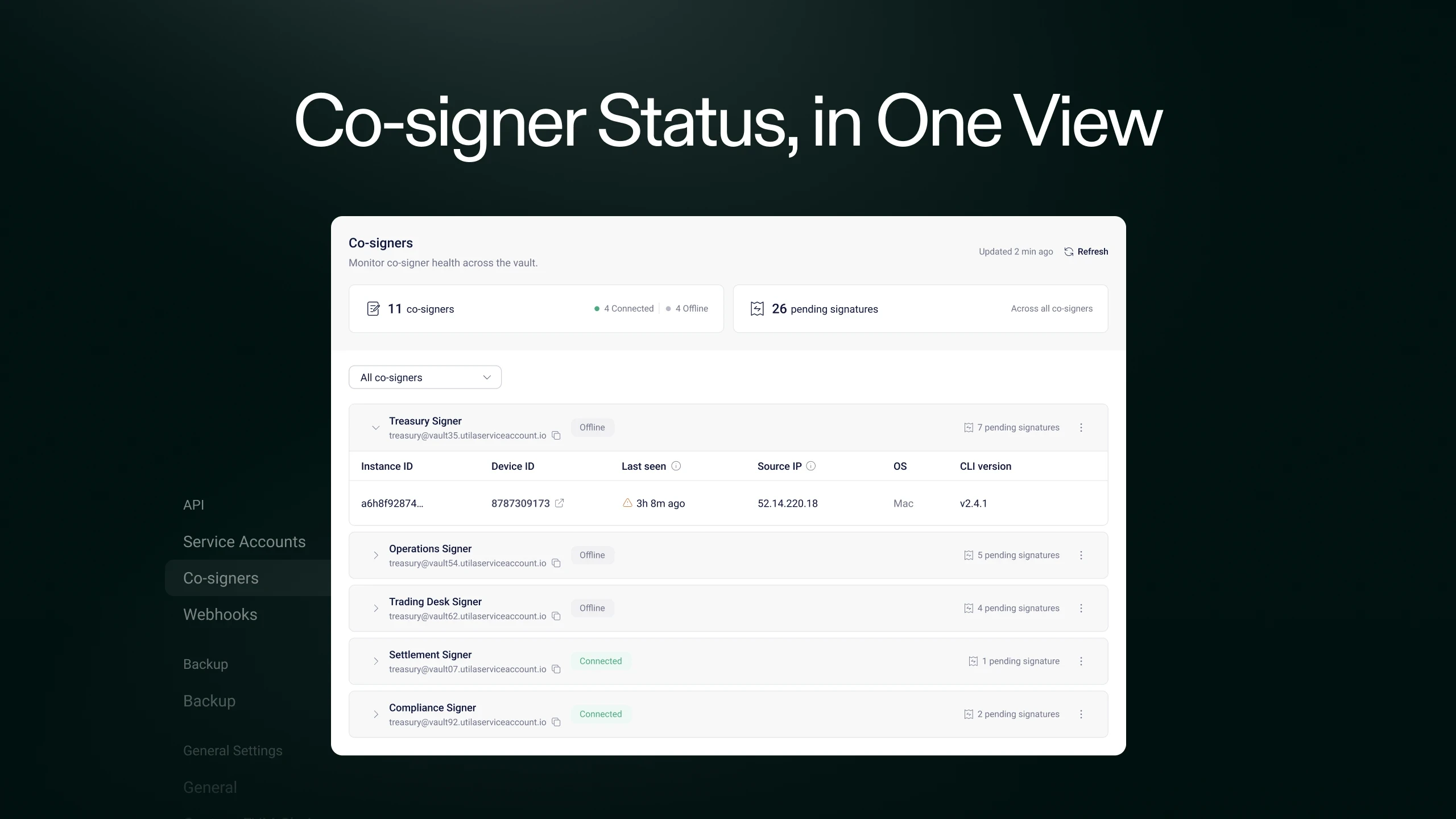
Under Vault Settings > API > Co-signers, you can see every co-signer that has been active in your vault over the past seven days. The page combines a vault-wide overview with details for each co-signer and its instances:
Connection overview: Total co-signers, including how many are connected and offline.
Pending signatures: Signatures awaiting completion across the vault.
Co-signer details: Connection status, pending transactions and active instances for each co-signer.
Instance details: Device ID, source IP, last seen timestamp, operating system and CLI version for each process.
A co-signer appears as connected when at least one instance has polled the API within the last five minutes. If no instance has polled within that window, it appears as offline.
This status provides a starting point for investigation. Expanding a co-signer row lets your team inspect the individual processes behind it.
Inspect Instances and Redundancy
Each expanded row shows the processes running under that co-signer. Two processes started separately on the same device appear as separate instances, helping your team confirm what is running and where.
When only one instance is running under a co-signer, the page highlights it so you can assess whether to deploy a second. Utila supports runtime redundancy through a second process on a different machine using the same device. Device redundancy uses a second device with an independent key share and requires quorum approval.
That distinction helps your team review how its deployment is configured and decide where additional redundancy is needed.
Identify Maintenance and Troubleshooting Needs
CLI version tracking helps your team identify instances that need attention. When a connected instance runs an outdated CLI, a notice appears at the top of the page. The version column identifies the instances requiring an upgrade.
The actions menu on each co-signer row also provides direct access to related settings. You can copy the service account ID for API calls, open the service account settings or jump to the device detail page.
These details give your team a practical starting point for investigating a deployment or configuration issue.
Support Daily Operational Checks
Different teams can use the page to answer questions about the same signing infrastructure:
Operations and infrastructure teams: Confirm that a newly deployed co-signer is polling, inspect source IPs when investigating allowlist issues after a server migration, and identify outdated CLI versions.
Security and risk teams: Review redundancy coverage and identify co-signers that have stopped polling.
Support teams: Inspect connection and instance details during troubleshooting, with related service account and device settings accessible from the same page.
A shared view gives these teams a common reference when deciding what needs attention and who should investigate.
Review Your Co-Signers Today
The Co-signers page is available now to every Utila vault. As your signing deployment grows, use it to review connection status and identify maintenance or redundancy needs across your running instances.
Open Vault Settings > API > Co-signers to review your deployment. Check offline co-signers, inspect any running with a single instance and identify connected instances that need a CLI upgrade. Our co-signer documentation provides setup and configuration guidance.
Evaluating automated signing for your institution? Request a Utila demo to discuss your signing workflow and assess how co-signer monitoring and redundancy fit your operational requirements.
Contact us
We’ll get back soon
Reach out to our team for general inquiries related to product, sales, marketing or support.

Technical Product Marketing
Kimron Flicker works in product marketing at Utila, bringing content and marketing experience at Polygon Labs and Zengo to institutional digital asset infrastructure.